
hjkl
Short Vim editing drills in a real editor, from x and dd to marks and text objects
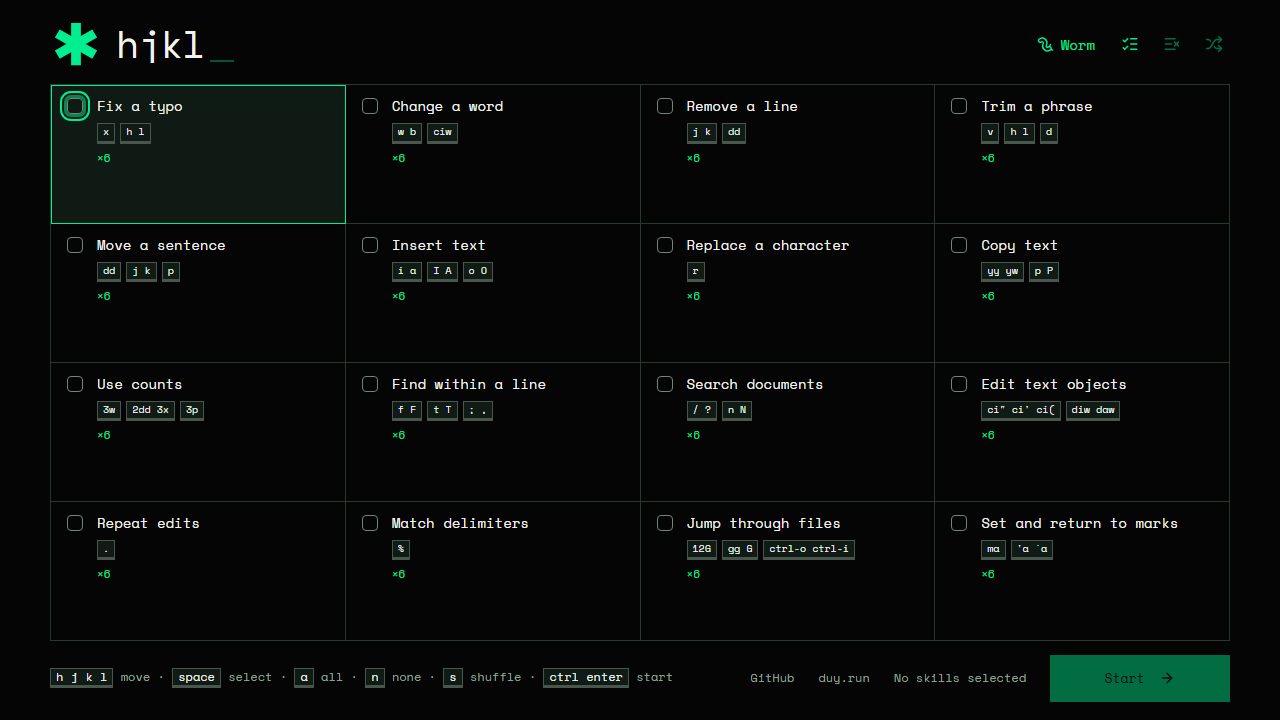
hjkl is a set of short Vim editing challenges in the browser. You pick the skills you want to practise and get small tasks in a real Vim editor: fix a typo, change a word, remove or move a line, insert text, copy and paste, and so on.
Free · No login · Browser · Beginner
About hjkl
There are 16 skill groups of six challenges each. They start with x, ciw, dd and visual mode and go on to counts, f and t, search, text objects, the dot command, % for matching delimiters, jumping through files with G and ctrl-o, and marks. You can shuffle, select all, or work through one skill at a time. It suits people learning Vim and anyone who wants a quick daily refresher.
It is free, runs in the browser and needs no sign-up. The maker plans to add more commands.
Questions about hjkl
How is each Vim skill broken down into edits?
- Each skill has six edits: two guided, two prompted and two that you do on your own. Any valid edit that reaches the target text passes, so you are not tied to one exact key sequence. Typing :help in Normal mode lists the current commands.
Can I practise on a phone or tablet?
- The site says it requires a desktop browser with a physical keyboard. It also stores nothing, so there is no saved progress to carry from one device to another.
Made this game? Claim it →
Tips and discussion
No tips yet.
Sign in to share a tip.